

 hi@shemify.com
Shemify is browser-based small business POS software for shops, cafés, restaurants, and service businesses that want checkout, receipts, searchable sales history, refunds, reporting, and staff access in one place. The same workspace can run on phone, tablet, or laptop, which makes it practical for owner-led counters, shared registers, and back-office review.
That matters because a small business usually needs more than a simple register. You need a clean receipt trail, quick answers when a customer comes back, clearer reports at day-end, and controls that let staff move fast without opening every sensitive action to everyone.
What strong small-business POS software should cover from day one

step 01
Launch the selling flow quickly
Build products, services, or menus with categories, prices, stock fields, modifiers, and barcode or SKU details that match the way your business actually sells.

step 02
Keep every transaction easy to revisit
Print or email receipts, search past sales, reprint a receipt, handle refunds, and answer follow-up questions without digging through separate tools.

step 03
Add team control when growth requires it
Move from one owner login to role-based access, logs, time clock, loyalty, gift cards, and deeper reporting without replacing the core workflow.
Built for the weekly realities small businesses actually manage

Counter, office, and owner view stay connected
Because Shemify runs in the browser, owners can review the business from a laptop while staff sell from a phone or tablet at the counter using the same system.

A cleaner paper trail for closeout and follow-up
Receipts, searchable history, refunds, expenses, and export-ready reports help small teams answer questions faster and close the day with fewer loose ends.

A plan path that stays practical as the team grows
Free works for one owner. Premium adds one location with up to 5 app-access users and deeper controls. Enterprise adds more than 5 users, multiple locations, and per-seat growth.
What Shemify covers for shops, cafés, restaurants, and service businesses
Built for owners who want the selling flow, the record trail, and the team layer to stay in sync as the business gets busier.
- Browser-based POS access on phone, tablet, laptop, or desktop
- Products, services, categories, variants, stock fields, modifiers, and barcode or SKU details depending on the workflow
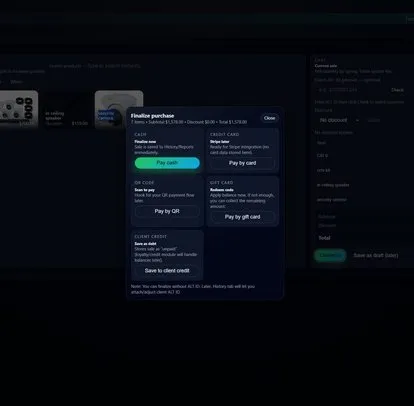
- Search or scan checkout with discounts, printed or emailed receipts, searchable history, and refund review
- Daily, monthly, and yearly reports, expenses, profit visibility, and export-ready records on paid plans
- Partner, manager, cashier, and custom roles with full logs, loyalty, gift cards, debts, and time clock on paid plans
- Paid plans in the app can extend into team workflows such as directory, onboarding, documents, time off, and payroll preparation
- Food and beverage businesses can use menus, tables, reservations, and a public restaurant page with an embeddable reservation widget
- Free for one owner login, Premium for one location with up to 5 app-access users, Enterprise for more than 5 users or multiple locations
Choose the starting point that matches how your business really sells
Small businesses usually get better results when they start with the workflow closest to the real counter, menu, or service flow instead of a generic feature list.
01
Retail and inventory-led selling
Start with Retail POS, Boutique POS, or Inventory management if categories, stock, barcodes, and faster item lookup matter most.
02
Food and beverage counters or dining rooms
Use Restaurant POS, Café POS, and Receipt printing if menus, tables, reservations, open tickets, and quick receipt flow matter most.
03
Service businesses and growing teams
See Barbershop POS, Sales reporting, and Pricing if you sell services, mix in retail items, or need a clean path from owner-only access to a larger team.
Small business POS software FAQs
Quick answers about devices, plans, workflows, receipts, reporting, and staff control.
Shemify keeps checkout, receipts, searchable sales history, refunds, reporting, and staff roles in one browser-based workspace. That helps small businesses start with the essentials and add deeper controls only when the workflow actually needs them.
Yes. Free is built for one owner login. Premium adds one location with up to 5 app-access users, and Enterprise adds per-seat access for larger teams or multi-location setups.
Yes. Shemify runs in the browser on phone, tablet, laptop, and desktop, so you can match the device to the counter, office, or owner workflow without needing a local install.
Printed or digital receipts, searchable history, refund review, reports, exports, and role-based access keep the business easier to review. Paid plans also add loyalty, gift cards, debts, time clock, and full logs.
Yes. Retail teams can use categories, stock fields, and barcode-ready lookup. Food and beverage businesses can use menus, tables, reservations, and a public restaurant page. Service businesses can combine services and stocked items in the same workspace.
Paid plans in the app can extend into team workflows such as directory, onboarding, documents, time off, and payroll preparation, so the business can keep people operations closer to the selling workflow.