

 hi@shemify.com
Shemify is browser-based cloud POS software for retail, cafés, restaurants, and service businesses that want one place for checkout, receipts, searchable sales history, refunds, reporting, and staff access. Instead of tying the business to a single counter machine, the same workspace can be used from phone, tablet, or laptop.
Start with one owner login and a simple counter setup, then add staff logins, role limits, advanced reports, branded receipts, loyalty, gift cards, debts, time clock, and multi-location structure only when the workflow actually needs them. That keeps the front counter simple while the operation stays more controlled behind the scenes.
Cloud POS should keep every device on the same workflow

step 01
Start in the browser on the device that fits the counter
Use Shemify on phone, tablet, laptop, or desktop without a local install. That makes it easier to launch fast, test your setup, and match the device to the way the business actually sells.

step 02
Keep checkout, receipts, history, and reports connected
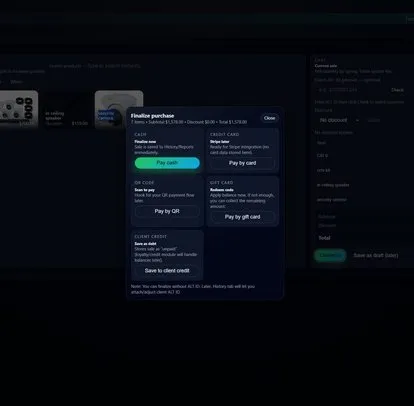
Search or scan items, apply discounts, finalize the sale, and keep the receipt trail easy to revisit later. The same workspace supports day-to-day checkout at the counter and cleaner end-of-day review for owners or managers.

step 03
Add users, controls, and locations when the business grows
Free keeps the launch lean. Premium adds up to 5 app-access users and deeper controls for one location. Enterprise extends the same cloud POS into per-seat access and multi-location workspaces.
Why operators move from one-device setups to cloud POS

Visibility is not locked to one machine
Owners can check history, reports, or activity from another device instead of waiting to get back to the exact counter station where the sale happened.

The selling flow stays consistent across devices
Catalog, receipts, permissions, and records stay aligned whether the team is using a tablet at the counter, a phone for a lighter setup, or a laptop in the back office.

Growth does not force a platform reset
When the business needs more users, stronger controls, customer programs, or multiple locations, the same cloud POS can expand instead of being replaced with a second system.
What Shemify covers in one cloud POS workspace
Built for teams that want clean counter operations now and better operational control as the business becomes more complex.
- Browser-based POS on phone, tablet, laptop, or desktop
- Products and services with categories, taxes, cost, stock quantity, barcode or SKU, images, and optional promotions
- Search or barcode-ready lookup, quantity changes, discounts, coupons, and optional tips at checkout
- Printed or emailed receipts, searchable sales history, and item-level refund workflows
- Paid-plan reporting with daily, monthly, and yearly views, expenses, profit visibility, and export-ready records
- Owner, partner, manager, cashier, and custom roles with logs and tighter control over sensitive actions
- Loyalty with points or stamps, VIP tiers, bonus events, member discounts, customer lookup, and digital or physical gift cards
- Time clock, debts management, and multi-location access when the operation grows beyond a basic register
Roll out cloud POS in a sequence that keeps the counter smooth
The cleanest launches usually start with business setup, top-selling items, and a real device test before more seats or locations are added.
01
Set branding, taxes, and the receipt flow first
Make sure your business name, logo, taxes, and receipt setup are ready before the first live sale so the customer-facing experience looks clean from day one. See receipt printing.
02
Load your top items and test the exact hardware path
Start with the products or services you sell most, then test the browser, device, printer, and barcode workflow you plan to use at the counter. See barcode scanning and hardware & integrations.
03
Add staff roles and deeper controls only when needed
Once the core selling flow is stable, add staff permissions, move into sales reporting, and upgrade from Free to Premium or Enterprise when you need broader access or multiple locations.
Cloud POS FAQs
Answers about browser-based access, devices, barcode workflows, internet requirements, and growth.
Shemify runs in the browser and keeps checkout, receipts, searchable sales history, reporting, and staff access inside one workspace, so the same POS can be used across phone, tablet, and laptop.
Yes. Shemify is browser-based and can be used on phone, tablet, laptop, and desktop, which makes it easier to match the device to the counter, office, or owner workflow.
Yes. Free starts with one owner login, Premium supports one location with up to 5 app-access users, and Enterprise scales beyond 5 users with per-seat access and multiple locations.
Yes. Shemify supports printed or emailed receipts and barcode-ready lookup. Before rollout, test the exact browser, device, printer, and scanner setup you plan to use at the counter.
Shemify is cloud-first, so a stable connection is recommended. If the connection drops, functionality may be limited until you are back online.
Paid plans add deeper controls such as advanced reports, full logs, branded receipts, loyalty, gift cards, debts, time clock, and broader team or location access depending on the tier.