

 Contact form
 hi@shemify.com
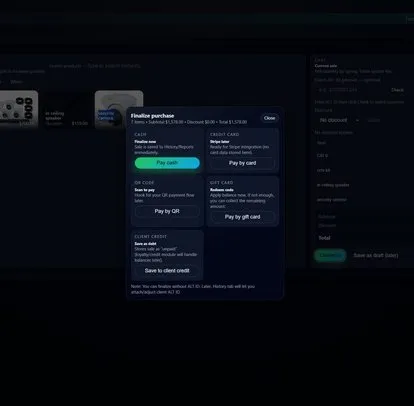
Shemify gives retail, café, restaurant, and service businesses one browser-based receipt workflow tied to the sale itself. Print at the counter when paper matters, send a digital copy when that is the cleaner experience, and look up the same receipt later from searchable sales history when a customer needs a reprint, resend, or refund follow-up.
That keeps receipt printing practical instead of fragile. The goal is not to promise every printer on the market. The goal is to use the exact device, browser, and print path your team will use live, then make sure the receipt, history, and staff workflow all hold together under real counter conditions.
Build the right receipt flow around the real counter

step 01
Pick the live counter device first
Because Shemify runs in the browser, the receipt workflow starts with the phone, tablet, or laptop staff will actually use. That decision affects printing more than any single accessory later.

step 02
Choose printed, digital, or both
Some counters print every sale. Others prefer digital or emailed receipts unless a customer asks for paper. Shemify supports both paths, so the setup can match the pace of the counter and the customer expectation.

step 03
Test the follow-up path, not just the first print
Before launch, confirm that staff can reprint or resend from sales history and that line items, discounts, taxes, and totals all read cleanly when the receipt is viewed again later.
Printer compatibility depends on the full setup, not just the printer brand

Device and browser path
If the counter device already prints to the target receipt printer or standard printer, Shemify can usually follow that same path. The device and browser matter as much as the printer itself.

Connection method matters
USB, network, Bluetooth, AirPrint, or similar print methods can behave differently. Test the exact connection path you plan to use before the counter opens to customers.

Standardize one tested setup
Once the workflow is reliable, keep the same browser, printer path, and paper process across the counter so reprints, shift handoffs, and daily operations stay predictable.
What stays connected after the receipt is issued
The print step matters, but the bigger win is what happens after the sale. Shemify keeps the receipt tied to the same browser-based sales record, so follow-up stays cleaner for both staff and customers.
- Printed or digital receipts depending on how the counter operates
- Receipt reprints and re-sends from searchable sales history
- Business-branded receipts on paid plans
- Refund-friendly sales lookup tied to the original transaction
- Browser-based access on phone, tablet, laptop, or desktop
- Role-based access and logs on paid plans for shared counters
- Cleaner line items, totals, and day-to-day record keeping across checkout and reporting
Go live with a receipt setup that holds up under pressure
Most receipt issues do not start with the sale itself. They show up when the wrong device is paired with the wrong printer, when names are messy, or when staff do not know the fallback.
01
Test on the exact live device
Do not validate on one laptop and then go live on a different tablet. Use the real device, browser, and printer combination the counter will actually depend on.
02
Review the receipt content, not just the print
Keep product and service names readable, confirm taxes and totals, and on paid plans make sure branding and business details look correct before opening day.
03
Give staff one clear fallback
When printing is not the best choice, staff should know whether to send a digital receipt, reprint from history, or escalate to a manager. That keeps the line moving without improvisation.
Related guides and next steps
Hardware & integrations
See how device choice, printer compatibility, barcode workflows, and cash handling fit around the counter before you standardize your live setup.
Cloud POS software
Plan around phone, tablet, and laptop access first, then decide how much printing and shared-counter structure your operation actually needs.
Setup guides & rollout help
Use Docs for self-serve setup, or request a demo when you want a guided review of receipts, devices, and team workflows.
Receipt printing FAQs
Quick answers about printer fit, digital receipts, reprints, branding, and plan coverage.
Yes. Shemify runs in the browser on phone, tablet, laptop, and desktop. If your device already prints to the target printer or standard printer, Shemify can usually follow that path. Exact fit still depends on the device, browser, and connection method.
Yes. Shemify supports printed or digital receipt workflows, so you can match the receipt path to the counter, queue, and customer preference.
Yes. Shemify keeps sales history searchable so staff can look up past transactions, reprint receipts, resend a customer copy, or review the sale during refunds and follow-up.
Paid plans add business-branded receipts, while core receipt workflows stay part of the everyday POS flow.
In many cases, the cleanest answer is to use the printer your device already supports. If your phone, tablet, or computer can already print to it, Shemify can usually follow that workflow. Always test the exact device, browser, and connection method before launch.
Core checkout, receipts, and sales history are part of the starting workflow. Paid plans add business branding and broader team controls. See pricing for current plan detail.
Share your business type, country or region, exact counter device and browser, printer model, connection method, and whether you need printed, digital, or both. That makes the setup review much more precise.