POS sales
Revenue, tickets, tenders, discounts, refunds, hourly volume, and product mix.

Generative AI inside your operating system
Built for owners, operators, managers, and multi-location teams that want grounded answers instead of generic AI copy. ShemifAI works best when it can read the same operating record the business already uses every day.
A generative AI business assistant inside Shemify.
Owners, operators, managers, and multi-location teams.
POS sales, labor, inventory, orders, reservations, payroll, and customers.
Grounded answers, forecasts, recommendations, alerts, and action plans.

Review prompts, source-backed answer formats, workflow entry points, and the vertical AI pages for restaurant, retail, inventory, labor, and multi-location teams.
Get a demoShemifAI is not just a chat box bolted onto the side of the product. It is meant to sit inside the same platform that already holds the business record, so answers can stay closer to reality.
Uses connected business context from the merchant workspace instead of asking the owner to rebuild it in every prompt.
Designed for retail, restaurant, café, and service operators who need decisions tied to live operations.
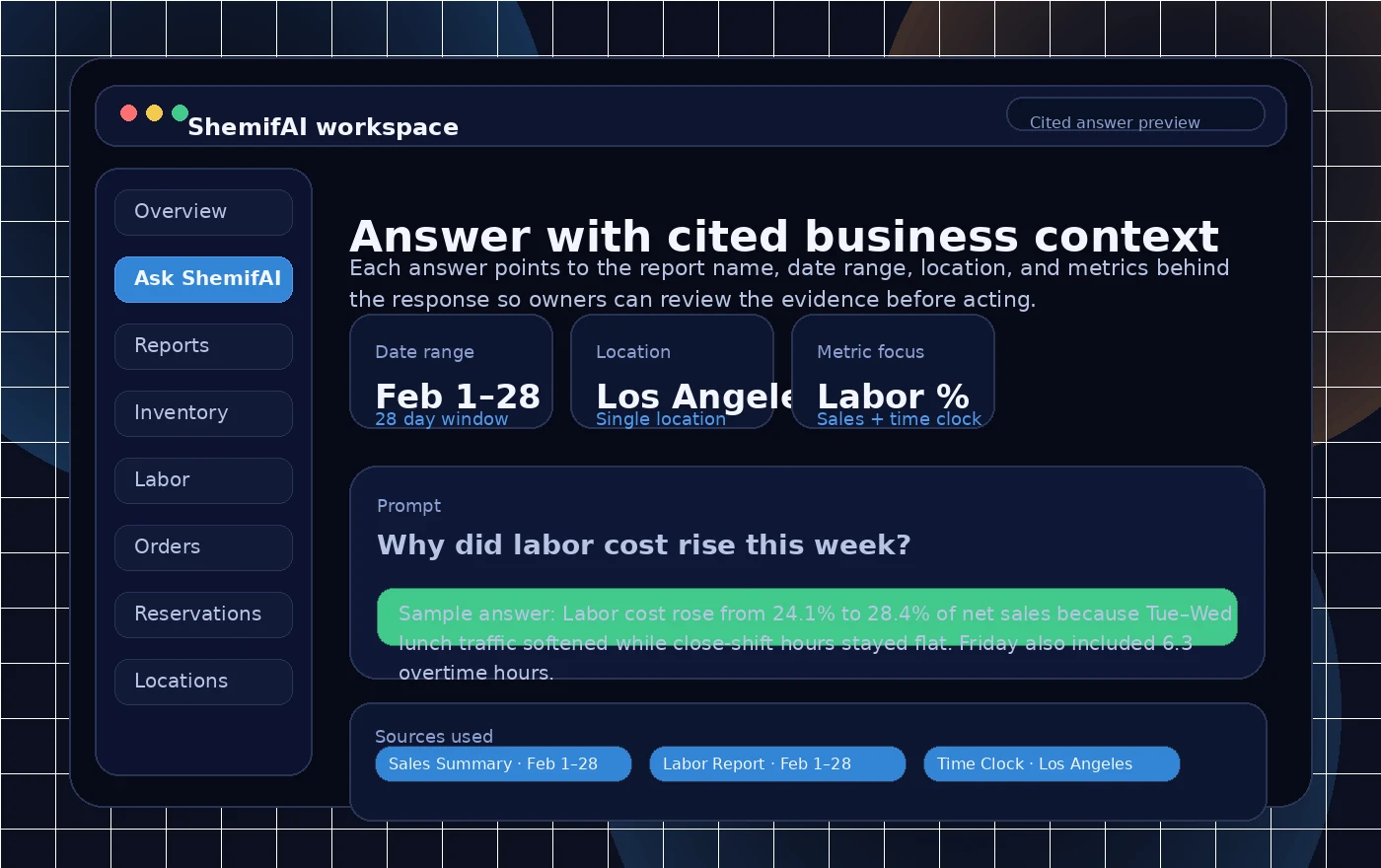
Keeps the report names, date range, location, and metrics visible so the answer can be reviewed fast.
Moves from explanation to next-step recommendation, forecast, alert, or owner-ready summary.
Without data grounding, “tailored answers” still sounds abstract. This is the operating record ShemifAI is meant to read when the business runs on Shemify.
Revenue, tickets, tenders, discounts, refunds, hourly volume, and product mix.
Catalog performance by SKU, variant, menu item, modifier, or bundle.
Cost, price, discount impact, and where margin has drifted.
Hours, overtime, role mix, attendance, and shift-level labor patterns.
Payroll-related records, team structure, and role-aware access context.
Channel mix, basket size, promo performance, and order timing.
Covers, pacing, no-shows, table demand, and guest flow trends.
Visit frequency, average spend, retention patterns, and offer response.
Location comparisons, outliers, trend shifts, and roll-up summaries.
Buyers need concrete capability boundaries, not vague AI language. ShemifAI is most useful when the business understands the exact jobs it can help with.
Explain what happened in plain business language using the operating data already inside the workspace.
Break down trends by date, location, item, channel, staff role, or service window.
Suggest next actions such as promotions, staffing focus, reorder timing, or menu mix changes.
Project traffic, labor pressure, item demand, or revenue impact from recent patterns.
Flag anomalies such as margin drops, no-show spikes, stock risks, or labor overruns before they get missed.
Turn a finding into an owner-ready summary, checklist, exportable note, or review queue for the right manager.
This is the biggest difference between a generic answer and an operator-grade one. Owners should be able to see what reports were used, which date range was selected, what location scope was included, and what metrics moved.
Based on Sales Summary, Labor Report, Reservation Trends, and Item Margin Report for Los Angeles locations, Feb 1–28:
Labor cost rose because overtime hours increased on Friday dinner shifts while average covers per server dipped. Three chicken bowl variants also lost margin after discount usage rose and food cost moved up.
Based on Sales Summary, Labor Report, and Reservation Trends for Los Angeles location, Feb 1–28.
The prompts below mirror the kinds of questions operators actually ask. The outputs are illustrative formats using sample data so the team can see how grounded answers should read.
Illustrative output
Based on Sales Summary, Labor Report, and Reservation Trends for Santa Monica, Feb 1–28, labor rose 2.8 points because overtime expanded while average covers per server dipped after 8:00 PM.
Illustrative output
Based on Item Margin Report, Product Sales, and Promotion Activity, the spicy chicken bowl, family fry pack, and iced matcha lost margin after discount usage rose and food cost moved up.
Illustrative output
Based on Multi-location Summary, Labor Report, and Customer Trends, Downtown is the priority because traffic softened, labor rose, and repeat visit rate fell while the other stores stayed near plan.
All outputs above are illustrative formats using sample data to show how a grounded answer can look.
The best generative AI layer does not wait for the owner to ask every single question. It should also surface the changes worth attention.
Give the owner a daily or weekly readout of revenue, labor, online orders, reservations, and notable changes.
Surface unusual spikes or drops before they hide in long report lists.
Spot where discounting, cost changes, or product mix are hurting profit.
Find service windows, channels, or days with rising no-shows or pacing issues.
Call out overtime, shift drift, and role mix that push labor above target.
Use sell-through and stock risk to highlight what needs attention before it runs out.
Find products or menu items with declining demand, margin, or repeat attachment.
This is where generative AI becomes more useful than a generic assistant. Instead of just describing the past, it can help owners think through the next move.
Model the likely revenue, margin, and volume tradeoff using recent demand and discount behavior.
Estimate labor pressure relief, service capacity, and whether the added cost is justified.
Compare saved labor against lost demand using hourly sales, party mix, and order patterns.
Project ticket lift, margin impact, repeat customer response, and inventory pressure before launch.
Generative AI should feel native to the workflow, not bolted on as a separate subscription. These pages are the strongest entry points to promote that idea across the site.
Reporting
Turn report reading into faster decisions with cited trend explanations and outlier detection.
Inventory
Check stock risk, slow movers, reorder timing, and variant-level drift from the same catalog record.
Labor
See labor cost pressure, overtime drivers, and role-based insight with permission-aware answers.
Online orders
Review channel performance, promo lift, average order value, and item attachment without manual exports.
Reservations
Explain no-show spikes, pacing gaps, and service window demand with reservation context included.
Multi-location
Compare stores, rank priorities, and surface the locations that need action first.
Owner, manager, payroll staff, and location manager should not all see the same answer depth. ShemifAI becomes more trustworthy when it respects the same operational roles already set in the workspace.
Strong AI positioning needs a visible trust layer. This section keeps the governance conversation on the page instead of burying it in sales calls.
ShemifAI is intended to answer from the current merchant workspace instead of depending on a generic prompt alone.
Role and location scope matter. Owners, managers, payroll staff, and location leads should not all see the same answer depth.
Grounded answers should show the report names, date range, location scope, and metrics used so the operator can verify the output.
Use the same role controls, logs, exports, and review steps that already support the wider Shemify workspace.
High-impact payroll, pricing, finance, or policy changes should stay human-approved even when AI helps frame the recommendation.
Model-provider, retention, and data-processing settings should be reviewed in onboarding and documented in your trust workflow.
Continue to Security & Trust and Privacy for the broader platform controls behind the workspace.
Instead of calling out a brand name, compare the workflow: a separate AI subscription versus a generative AI layer built into the same business platform.
| Grounded generative AI layer | Typical standalone AI tool | ShemifAI inside Shemify |
|---|---|---|
| Live business data grounding | Usually depends on whatever the user manually pastes into the prompt. | Reads from the business record already inside Shemify. |
| Cited answers | Source visibility is often inconsistent or manual. | Built around answers that can point to the report names, date ranges, locations, and metrics used. |
| Multi-location rollups | Often requires the operator to combine files or describe the scope by hand. | Can compare stores and keep location scope visible inside the same platform. |
| Proactive alerts | Often waits for a user prompt before surfacing a finding. | Can surface summaries, anomalies, margin drift, labor pressure, and reservation issues sooner. |
| What-if planning | Requires heavy manual setup and context entry for each scenario. | Uses connected sales, labor, inventory, order, and reservation context for operational tradeoffs. |
| Role-based permissions | Usually handled outside the AI tool itself. | Fits inside Shemify roles, location scope, and team permissions. |
| Auditability | Operators often need to reconstruct what data informed the answer. | Grounded answer formats can keep the supporting scope and sources visible. |
| Workflow actions | Often ends at the chat answer. | Can feed summaries, review queues, and owner-ready action lists inside the operating workflow. |
| Bundled vs separate subscription | Usually another disconnected tool and another line item. | Lives as part of the wider Shemify platform instead of becoming one more disconnected stack layer. |
Capabilities vary by product and deployment. The point of the comparison is the operating model: separate AI subscription versus a generative AI layer inside the same business platform.
Create crawlable, descriptive internal links so buyers and search engines can understand how the same generative AI layer changes by workflow.
These answers focus on the trust-heavy questions buyers ask before they take a generative AI product seriously.
ShemifAI is Shemify’s generative AI business assistant for retailers, restaurants, cafés, and multi-location operators. It is built to answer from the merchant’s operating data inside Shemify instead of relying on a generic prompt alone.
ShemifAI is designed to answer from the business context inside Shemify, including reports, locations, permissions, and recent operational records. Owners should still review cited sources before making sensitive decisions.
That is the goal of grounded answers. ShemifAI should be able to point back to the report names, time window, location scope, and metrics that support the answer so the owner can verify it quickly.
Access should follow the same workspace permissions and security controls used across Shemify. Businesses should review their final privacy, retention, and deployment policy with Shemify during onboarding for any AI-supported rollout.
Yes. Owner, manager, payroll, and location-level roles should not see the same depth of business context. ShemifAI works best when it respects the workspace role and location scope already set in Shemify.
Yes. Multi-location businesses can use ShemifAI to compare stores, surface outliers, and prioritize where attention is needed most while keeping location context visible in the answer.
Yes. One of the advantages of ShemifAI is that it can combine connected operating data such as sales, labor, inventory, online orders, reservations, and customer records inside the same platform.
Yes. Like any generated summary, ShemifAI should be reviewed by the operator. The safest workflow is to read the cited reports, keep high-impact payroll or financial actions human-approved, and treat the AI as a decision-support layer rather than an autopilot.
Model-provider, retention, and training settings should be confirmed in your final deployment and trust review. The intended operating model is to keep ShemifAI grounded in the merchant workspace and permission scope.
Use ShemifAI during comparison and migration
Use the pages below if a buyer wants to compare software, plan a migration, and then review what ShemifAI can do with the resulting operating record.
Browse OpenTable, Shopify, Gusto, and Square comparisons.
Reservation migrationUse AI later to review no-show, labor, and cover trends.
Store migrationUse AI later to review sales, margin, and product performance.
Payroll migrationUse AI later to review labor percentage and staffing patterns.
POS migrationUse AI later to review catalog, location, and labor performance.