

 hi@shemify.com
Shemify is browser-based retail POS software that keeps products, barcode-ready checkout, receipts, searchable sales history, refunds, reporting, and staff access in one workspace. Staff can move from lookup to sale without bouncing between tools, while owners and managers keep clearer records after the rush.
That makes it a practical fit for boutiques, gift shops, specialty stores, pop-ups, and other retail counters that want speed at the register now and stronger operational control as the catalog and team grow. Start on phone, tablet, or laptop, then add customer programs, branded receipts, role limits, and deeper reporting only when the workflow calls for it.
What strong retail POS software should keep connected every day

step 01
Build a catalog staff can find fast
Keep categories, barcode or SKU details, quantity fields, and receipt-friendly naming consistent so search and scan stay quick even when the line gets longer.

step 02
Keep the counter simple during rushes
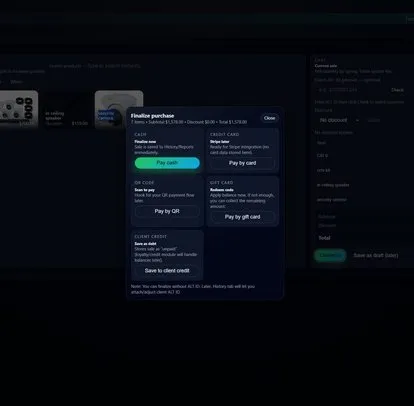
Search or scan items, apply discounts, collect payment, and issue printed or digital receipts from one consistent selling screen instead of piecing together separate tools.

step 03
Review every sale with cleaner history and reports
Reprint or resend receipts, check refund activity, review best sellers and category trends, and use the day-end record to make smarter restocking and pricing decisions.
Retail software that helps the floor move faster without losing manager control

Receipts, reprints, and cleaner follow-up
Give customers a printed or digital receipt at checkout, then revisit the same transaction later when they need another copy, a return review, or a quick answer about what was purchased.

Discounts and refunds can stay with the right roles
As more staff share the counter, Premium and Enterprise let you separate everyday checkout from pricing-sensitive actions like discounting, refund handling, and settings changes.

Customer tools and multi-location structure when you need them
Paid plans add loyalty, gift cards, debts, time clock, and deeper reporting. Enterprise adds multi-location and per-seat structure when one retail counter grows into a larger operation.
What Shemify covers for retail stores, boutiques, gift shops, and specialty counters
Built for merchants who want the selling flow, the receipt trail, and the management layer to stay connected.
- Browser-based POS on phone, tablet, laptop, or desktop
- Catalog setup for categories, prices, costs, quantity in stock, and barcode or SKU details
- Search or scan checkout with discounts, printed or emailed receipts, and refund-friendly history
- Daily totals, best sellers, category trends, expenses, profit visibility, and exports on paid plans
- Partner, manager, cashier, and custom roles for cleaner team access
- Loyalty, gift cards, debts, time clock, branded receipts, and full logs on paid plans
- Free for one owner login, Premium for one location with up to 5 app-access users, Enterprise for more seats and multiple locations
Choose the plan by who needs login access, what controls matter, and how many locations you run
Retail teams do better when the register stays simple for cashiers and the people responsible for pricing, returns, and reporting still have a clear view after closing.
01
Start with core checkout and daily history
Free works best when one owner needs products, receipts, and day-to-day sales history without adding staff logins yet.
02
Add staff roles and deeper retail controls
Premium adds one location with up to 5 app-access users, plus reporting, logs, branded receipts, loyalty, gift cards, debts, and time clock.
03
Move to multi-location without rebuilding the workflow
Enterprise is there when you need more than 5 app-access users, multiple locations, or a cleaner seat structure across stores and teams.
Retail POS software FAQs
Quick answers about browser access, barcode-ready retail checkout, receipts, permissions, and plan growth.
Retail POS software is the system a store uses to organize products, ring up sales, issue receipts, and review sales records later. Shemify keeps checkout, receipts, searchable sales history, reporting, and team controls in one browser-based workspace.
Yes. Shemify runs in the browser on phone, tablet, laptop, and desktop, so retail teams can match the device to the counter or office workflow without relying on a dedicated local install.
Yes. Shemify products can include categories, selling price, cost, quantity in stock, and barcode or SKU details so staff can find items faster and owners can keep the catalog cleaner.
Yes. Retail teams can use printed or digital receipts, then revisit searchable sales history later for reprints, follow-up questions, and refund review.
Premium and Enterprise support Partner, Manager, Cashier, and custom roles so discounts, refunds, pricing changes, and settings can stay with the right people.
Free is built for one owner login. Premium adds one location with up to 5 app-access users plus deeper controls. Enterprise adds multiple locations and more than 5 app-access users with per-seat billing.