

 hi@shemify.com
Shemify gives retail teams one browser-based POS for products, checkout, receipts, searchable sales history, refunds, reporting, and customer programs. Staff can search or scan, apply a discount, complete the sale, and revisit the same record later for reprints, follow-up questions, or cleaner refund handling.
For shops, boutiques, pop-ups, and specialty retail counters, the real work is keeping the counter quick without losing visibility into categories, stock, staff actions, and what is actually selling. Shemify keeps those pieces connected on phone, tablet, or laptop, then adds deeper controls as the operation grows.
Fast retail checkout starts with a clean catalog and ends with records you can still trust after the rush

step 01
Organize the catalog the way staff search
Use clear categories, predictable product names, size or color variants, price, cost, quantity in stock, and barcode or SKU details so search and scan stay faster when the line builds.

step 02
Sell with search, scan, discounts, and receipts
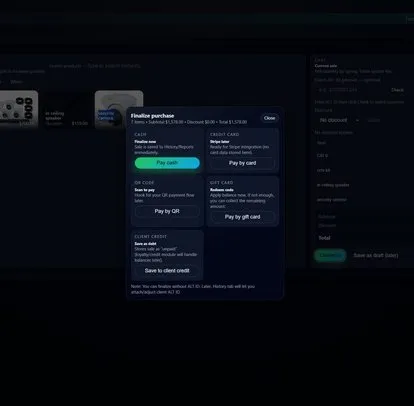
Search or scan items, apply promotions or coupon codes, complete checkout, and give customers a printed or digital receipt without switching between tools at the counter.

step 03
Use history and reporting to answer questions faster
Reopen past sales, resend or reprint receipts, review best sellers and category movement, and use expenses plus profit visibility to make restocking and markdown decisions with better context.
What retail teams usually add once the floor gets busier and the back office needs more control

Branded receipts and a cleaner paper trail
Paid plans can brand the app and receipts with your business details, while searchable history keeps past sales easier to review when a customer needs another copy or a manager needs to verify what happened.

Loyalty, gift cards, and customer lookup
When repeat visits matter, paid plans add phone-based customer lookup, loyalty rules, gift cards, and customer tools that keep promotions tied to real purchase history instead of scattered notes.

Roles, logs, time clock, and location structure
As more people touch the register, Shemify adds role-based access, full logs, and time clock workflows. Enterprise is there when one store becomes multiple counters or multiple locations.
What Shemify covers for general retail, boutiques, gift shops, and specialty counters
Built for merchants who want the selling flow, the receipt trail, and the management layer to stay connected.
- Browser-based POS on phone, tablet, laptop, or desktop
- Product setup with categories, selling price, cost, quantity in stock, unit of measure, barcode or SKU, optional promotions, and product images
- Search or scan checkout for shops, pop-ups, and barcode-ready retail counters
- Discounts, coupon codes, printed or emailed receipts, searchable history, and refund workflows
- Reports with daily totals, best sellers, category trends, expenses, profit visibility, and exports on paid plans
- Loyalty points or stamps, VIP tiers, gift cards, and customer lookup when repeat-visit tools matter more
- Role-based access, full logs, time clock, branded receipts, and cleaner operational control for growing teams
- Free for one owner login, Premium for one location with up to 5 app-access users, Enterprise for more seats and multiple locations
Give staff a faster counter while owners keep pricing, returns, and reporting under control
Retail systems work better when checkout stays simple for the floor and the people responsible for pricing, returns, and restocking can still see the full picture after closing.
01
Protect pricing-sensitive actions
Use staff permissions so discounts, refunds, settings, and branding changes stay with the right roles instead of being open to everyone on the register.
02
Restock from facts, not guesswork
Use sales reporting and inventory fields to review best sellers, category movement, expenses, and margin signals before you reorder or mark down slow movers.
03
Grow from one store to multi-location
Start on Free or Premium for a single shop, then move to Enterprise when you need more than 5 app-access users, multiple locations, or broader seat control.
Retail POS FAQs
Quick answers about product fields, barcode-ready checkout, receipts, customer programs, permissions, and plan structure.
Yes. Shemify is browser-based retail POS software for shops, boutiques, and specialty stores that need products, barcode-ready lookup, receipts, searchable history, refunds, reporting, and staff control in one workspace.
Yes. Shemify products can include categories, selling price, cost, quantity in stock, units, and barcode or SKU details. Scanning that code in POS can add the product automatically, and exact hardware fit should still be tested on your device and browser before rollout.
Yes. Shemify can print or email receipts, and sales history stays searchable so staff and managers can revisit past transactions, resend receipts, and review item-level details later.
Yes. Premium and Enterprise support Partner, Manager, Cashier, and custom roles so discounts, refunds, pricing changes, and settings can stay with the right people.
Yes. Shemify supports product promotions and coupon codes at checkout, and paid plans can add loyalty, gift cards, and customer lookup for repeat-visit workflows.
Free is built for one owner login. Premium adds one location with up to 5 app-access users plus deeper controls. Enterprise adds multiple locations and more than 5 app-access users with per-seat billing.